Update to Null’s Royale Version 5.142.17 with New Tower Defense
In the latest version of Null’s Royale, we’ve finally introduced the Cannoneer, a new warrior type for the tower. Changing…
Read more →Открыты все карты и режимы, бесконечные гемы и золото, кастомный контент и быстрые обновления. Онлайн бои и клановые битвы.
Get access to all cards, challenges, 2v2 battles, and modified game modes featuring custom cards.
Unlimited gems, cards, and gold. Max out your account and try the Unlimited Elixir mode for the ultimate Clash Royale experience.
Install via APK or AltStore/Sideloadly. Guides and troubleshooting.
Null’s Royale is a custom private server based on the game Clash Royale, created by the Null’s Team. The server’s development began back in 2016, right after the official game was released by Supercell. Since then, it has introduced many unique features — from custom cards and exclusive characters to a convenient account-saving system known as Null’s Connect.
Since 2017, Null’s Royale has remained the most popular private Clash Royale server, attracting over 10,000 players every day.
Null’s Royale offers full multiplayer PvP battles in real time, across all main game modes. It’s the perfect place to enjoy Clash Royale without restrictions — no grinding for gold or paywalls. Focus on strategy, build your dream deck, and level up your profile the fun way!
In the latest version of Null’s Royale, we’ve finally introduced the Cannoneer, a new warrior type for the tower. Changing…
Read more →
The long-awaited update to Null’s Royale version 8.256.22 is finally here, bringing new decorations and exciting features. Although the Goblin…
Read more →
The Null’s Royale server has been updated to the latest version 11.548.0, which includes all the current seasonal changes, fresh…
Read more →Null’s Royale is a carefully tuned private server that brings the full Clash Royale experience to your devices. Faster updates, unlimited resources for testing decks, and smooth gameplay — one server, two platforms.
How does the original Clash Royale differ from the private server Null’s Royale? The universe is the same, but the progression system is completely different.
In the official game, you complete quests, take part in seasonal events, buy battle passes, and spend a lot of time (and money) to upgrade your cards and build your collection. Unlocking all cards and maxing them out can take years.
On Null’s Royale, things are much simpler. Here you get:
The key difference is that you immediately get access to all content: play with any card at max level, customize your unique profile, and enjoy the game without restrictions.
| Feature | Clash Royale | Null's Royale |
|---|---|---|
| Price | ✅ Free | ✅ Free |
| Resources | ❌ Limited | ✅ Unlimited |
| Server | ✅ Official Multiplayer | ✅ Custom Multiplayer |
| Champions / Heroes | ❌ Long progression | ✅ Max progression |
| Evolutions | ❌ Scarcity of Wild Shards | ✅ Unlimited Wild Shards |
| Pass Royale | ❌ $8.49 / $16.99 | ✅ Fully unlocked |
| Multiplayer | ✅ 24/7 | ✅ 24/7 |
| Tower Skins | ≈20+ | 135 |
| Emotes | ≈70+ | 558 |
| Banners | ≈29+ | 489 |
The game gets stuck at 75% during loading, usually because the ISP blocks the server IP.
How to fix:
Often happens after manual install via Sideloadly/AltStore. Such builds work ~7 days and require re-signing.
Tip: Use Wi-Fi–based install so the app re-signs automatically when your PC is on and the device is connected.
Appears during install and usually means a corrupted file.
Solution:
Most content (cards/graphics/emotes) streams from the server. Under heavy load the update screen may hang.
What to do:
Unable to connect with the server. Check your internet connection and try again.
Classic network issue caused by an unstable connection.
How to fix:
Didn’t find your error? Tell us via the feedback form — we’ll help.
Cool game modes are being added to the server — some of which may not be available on the official Clash Royale server.
Competitive 1v1 mode for players above 5,000 trophies. Earn ranked points to climb leagues and unlock exclusive rewards.
Team up with a friend or random player for co-op battles. No trophies at stake — just fun and practice!
Endless 1v1 battles with Infinite Elixir. Cards cycle non-stop for wild, nonstop action and testing new decks.
Entry: 10 Gems. Win up to 12 matches before 3 losses. Competitive but low-risk way to earn rewards.
Entry: 100 Gems. Hardcore version of Classic Challenge with higher rewards. Reach 12 wins to maximize prizes.
Entry: 50 Gems. Players draft cards turn by turn before battle. Strategic, skill-based mode with big rewards.
On Null’s Royale servers, you can use a set of commands to manage your account and check server information.
| Command | Description |
|---|---|
/clean |
Delete all cards and reset account progression. Clan and trophies remain unchanged. |
/status |
View server information (uptime, online players, etc.). |
/nickname |
Change your nickname color randomly (only available for premium before Feb 9, 2020). |
/premium uR6rKU3KNOuacqimhqL
When we first launched the Null’s Royale server, premium access was available for purchase. Players with premium received special features like a colored nickname — and that’s why this command exists. It allows access to a rare feature: manually adding trophies.
Currently, premium is no longer available for purchase.
However, there are exceptions: if you have the opportunity to showcase Null’s Royale to a large audience (for example, on YouTube or other social media platforms), feel free to contact us via the feedback form.
At the moment, commands are informational only, since account upgrades and progress have been moved to the in-game shop.
Additionally, you can instantly unlock premium banners using the auction item “Get All Banners Instantly!”.
On all servers you can use the /help command to get a full list of available options.

Here we’ll show you how to install the game easily via our website — using a direct link. We’ll provide several links that download the app from different servers.
If one link doesn’t work, try again a bit later.
⬇️ Install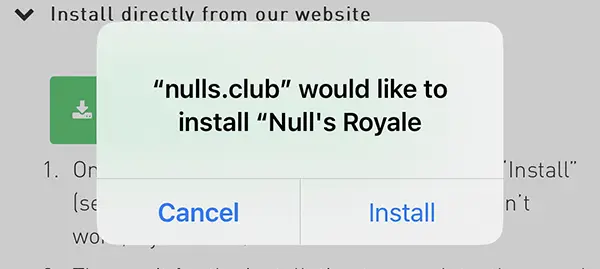
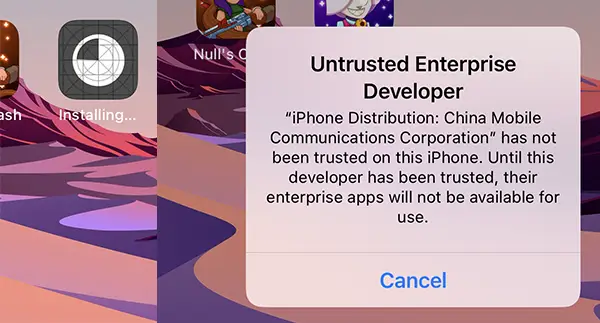
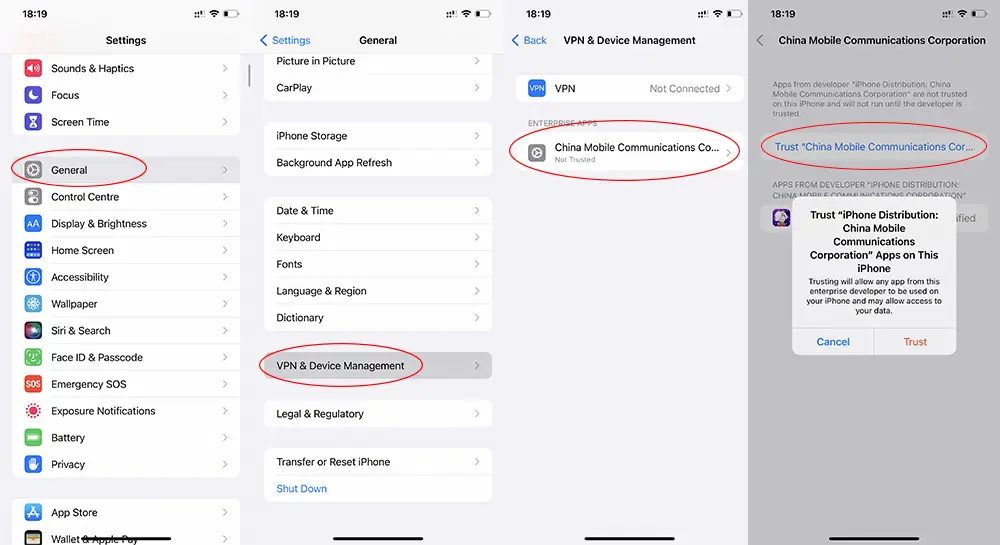
Installing the Android version is straightforward: download the APK and install it on your device. If the system asks for permission to install apps from unknown sources — enable it once and proceed.
If the first link is slow or blocked, try again later.
⬇️ Download APK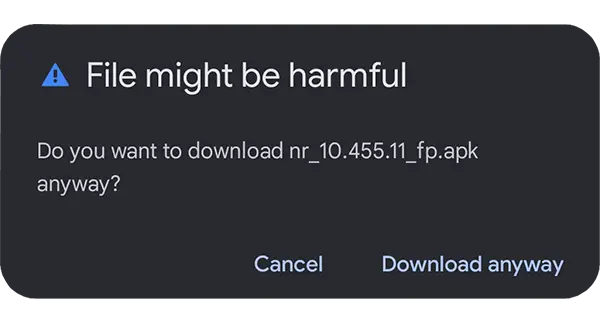


Частые вопросы про установку, безопасность и обновления. Раздел открыт для индексации: весь текст виден без скрытия.
Используйте кнопки в секции Direct Install (APK/iOS) выше. Если ссылка перегружена или заблокирована у провайдера — попробуйте альтернативную кнопку. Мы даём несколько зеркал.
Null’s Royale — отдельный приватный сервер, не связанный с официальными серверами Supercell. Мы рекомендуем не использовать ваш основной Supercell ID и играть на отдельном устройства/профиле. Ваш прогресс на официальном сервере не переносится.
Повторите установку через вторую кнопку. Если при запуске появляется окно о недоверенном разработчике — перейдите в Settings → General → VPN & Device Management и нажмите Trust на профиле. Подробные шаги — в разделе Instruction.
Это стандартное предупреждение для APK вне Google Play. Нажмите Download anyway, затем разрешите Install unknown apps для браузера/загрузчика. Потом вы можете отключить разрешение обратно. Подробности — в шагах Instruction.
Новые версии публикуем в этом же разделе установок. Обычно требуется скачать новую сборку. Мы указываем номер версии и дату обновления в карточке.
Сервер работает 24/7. Задержка зависит от вашего провайдера и региона. Если пинг высокий, попробуйте другое зеркало/DNS или мобильную сеть.